New Arrivals at Austin MacWorks – QuickerTek Nano & AirHawk Mobile Pocket Hard Drives

Archive for September, 2009

New Arrivals at Austin MacWorks – QuickerTek Nano & AirHawk Mobile Pocket Hard Drives

Monday, September 28th, 2009

austin macworks quickertek nano

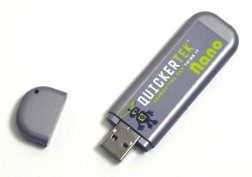
The QuickerTek Nano USB WiFi thumb drive will let all Mac users extend the range of their WiFi reception, and let you connect to wireless signals that your MacBook, MacBook Pro, Mac Pro or old-school PowerBook may not even see with just their internal Airport antenna. PowerBook G4 owners will love the QuickerTek Nano even more. The Titanium and Aluminum PowerBooks were known for their amazing design, however the shiny metal didn’t always offer the best WiFi reception. One simple driver and its plug and play extended WiFi on your iMac, MacBook or PowerBook with the QuickerTek Nano.

austin macworks high speed portable hard drivesWe saw the new AirHawk Mobile Pocket Hard Drives and  just had to offer them to our Austin MackWorks customers. The sleek and slightly angular design will look like it was custom made to sit next to your MacBook Air and MacBook Pro. The self-powered AirHawk Mobile Pocket Hard Drive is available with up to half a terabyte of drive space and comes out of the box with USB 2.0, FireWire 400 and FireWire 800 ports. If you’re doing media intensive projects such as iMovie, GarageBand, Final Cut, Logic or other high-end editing packages such as Pro Tools, the 7200 RPM drive combined with FireWire 800 speed will let you edit even the biggest audio and video projects while you’re on the road or just out for the weekend. Stop in today and let us introduce you to the full range of the AirHawk Mobile Pocket Hard Drives.

Post to Twitter Post to Delicious Post to Digg Post to Facebook Post to MySpace Post to StumbleUpon

Snow Leopard Application & Printer Compatibility

Friday, September 25th, 2009

So you’ve take the plunge or your thinking of upgrading your Mac to the new lean and mean version of OS X Snow Leopard. Even though there has been quite a bit of press about some compatibility issues with the Snow Leopard 10.6 upgrade, the vast majority of applications are indeed running smoothly under 10.6. You can find a full and daily updated list of applications and their compatibility with Snow Leopard here.

Printer Updates for Snow Leopard 10.6

One of the most common compatibility issues with the initial release of 10.6 was with printer drivers. The Apple 10.6.1 update, available by launching the Software Update application in your Apple Menu, fixes numerous printer incompatibilities. Once you’ve updated to 10.6.1, run the Software Update one more time and Software Update will look for installed drivers on your Mac and ask you to download and install the updates. If you are looking for HP drivers or if you are installing new HP drivers for the first time on Snow Leopard 10.6, a complete disk image file of all available HP Snow Leopard drivers is available on the Apple web site. One word of warning though, this disk image is close to 400 megabytes and will install all of the available HP printer drivers supported on Snow Leopard. Apple also recently released a complete disk image file of available Epson printer drivers for Snow Leopard. Run Software Update to install drivers for your Epson or download the complete Epson driver package here.

A complete list of all Snow Leopard 10.6 compatible printers and scanners is available here.

Post to Twitter Post to Delicious Post to Digg Post to Facebook Post to MySpace Post to StumbleUpon


Copyright © 2010 Austin MacWorks, All Rights Reserved