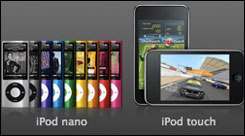
Apple Announces New iMacs, Mac Mini & Macbooks. Coming Soon to Austin MacWorks.

Archive for October, 2009

Apple Announces New iMacs, Mac Mini & Macbooks. Coming Soon to Austin MacWorks.

Tuesday, October 20th, 2009

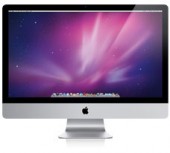
The Apple Mothership announced this morning a number of new products including a new lineup of iMac’s. newimacThe New iMac’s ship with either 21.5″ or 27″ displays. The top of the line iMac includes the new quad-core Intel Core i5 or Core i7 “Nehalem” processors. Wireless keyboards and the new multi-touch Magic Mouse ship standard on all iMacs.

Mac Mini’s get a processor bump up to 2.66 Mhz and 4 gigs of RAM. Apple also newminiintroduces a Mac Mini with Snow Leopard Server & two 500 GB drives pre-installed for $999.00

The MacBook also gets a bump and a re-engineer. It’s thinner, lighter and features a unibody polycarbonate enclosure along with multi-touch trackpad. The Macbook ships with an LED-backlit display, built-in lithium-polymer battery for longer battery life, 2 GB of DDR3 memory & 250GB hard drive.

newmacbook

Post to Twitter Post to Delicious Post to Digg Post to Facebook Post to MySpace Post to StumbleUpon

Apple Performance Upgrade & Tidbits

Monday, October 19th, 2009

Apple Performance Update

Apple has just released a software update designed to resolve slow hard drive response issues for many Mac users. The Performance Update 1.0 addresses intermittent hard drive related pauses. If your machine needs the update, launch software update in your utilities menu and install the Performance Update. More information on the update can be found on the Apple Website.

Another Happy Austin MacWorks Customer

Thanks to  Austin MacWorks customer Whitney for the great review she recently posted on Yelp. It always makes us feel good when one of our customers is pleased with our service and takes home a happy Mac! Here’s a bit of what Whitney had to say:

“…I went into Austin MacWorks that afternoon…just walked in…no appointment neccessary.  They couldn’t have been nicer… 2 days later, they called me and said that my computer was back, fixed, and that the repairs were covered under my Apple Care!  Hallelujah!”

GoToMyPC Coming to the Mac.

It’s been a popular PC remote access app, and now Citrix is announcing that GoToMyPC for Mac is in open beta. Keep an eye on the beta progress and download the beta here. Word is that an iPhone version is also expected.

Post to Twitter Post to Delicious Post to Digg Post to Facebook Post to MySpace Post to StumbleUpon

The Livescribe Pulse Smartpen

Monday, October 12th, 2009

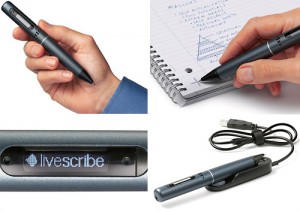
Living somewhere between the space occupied by PDA’s and note taking on your laptop comes a relatively new player into the computerized note space. The Livescribe Pulse Smartpen at first glance might leave you scratching your head about its usefulness, but after spending a few minutes with the Livescribe, you’ll instantly understand its how it will simplify your data and revolutionize your note taking. livescribe-2

The Livescribe Pulse Smartpen is a combo note-taker and audio recorder. Using special paper (available in a number of formats including journals and notepads), the software tracks your writing and records your notes, syncing them to your Mac the next time you dock your pen. Sure, it’s a neat trick, but the real payoff is using the notes with the built-in audio recording software. Tell the Livescribe Pulse Smartpen to record audio while you’re taking notes and it indexes the audio to your scribbles. Once you’ve docked and synced your notes on your Mac, simply tapping on your notes takes you to the recorded audio that corresponds to the timeline of of your notes.

The audio/notes sync feature will be a boon to anyone who has lots of data to remember and record. Students can record lectures and take notes and have instant access to the corresponding section of the lecture by simply tapping on the notes. Other obvious applications could include note taking for therapists, doctors, business professionals, songwriters, musicians… Pretty much anyone who needs to jot down notes, store them on the computer and have instant access to corresponding audio recordings.

The Livescribe Pulse Smartpen is available in 1 and 2 gigabyte models and comes with 250 MB of online storage for registered users who can share notes and audio as interactive Flash movies or PDF files. Stop into Austin MacWorks today and let us demo this very cool tool that will simplify note taking and data gathering for business professionals and UT students alike.

Post to Twitter Post to Delicious Post to Digg Post to Facebook Post to MySpace Post to StumbleUpon

Blackberry Sync is Back on the Mac

Saturday, October 3rd, 2009

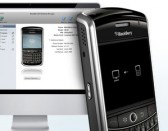
mac_blackberry_syncIt’s amazing what a little competition can do. It’s a sure bet that the rampant popularity of the iPhone has been a major factor for Research In Motion’s release of the new Blackberry Desktop Software for the Mac. Mac users had been mostly relegated to installing third party software solutions, such as The Missing Sync from Mark Space or PocketMac, to sync their Mac to a Blackberry.

With the new software from RIM, Blackberry users can update their smartphones with new firmware, add or remove applications, sync data from iCal, Address Book,  Entourage and more. The free download requires Mac OS X v10.5.5 and above, BlackBerry® Device Software v4.2 or higher and iTunes v7.7.1 or later for iTunes sync. Download the Blackberry Desktop Software here. Austin MacWorks would love to hear your comments if you own a Blackberry and have updated to the Blackberry Desktop Software for the Mac. Let us know how the new software is working out for you.

Post to Twitter Post to Delicious Post to Digg Post to Facebook Post to MySpace Post to StumbleUpon

Fujitsu ScanSnap S1500M – The Mac Scanning Solution for the Business Professional

Friday, October 2nd, 2009

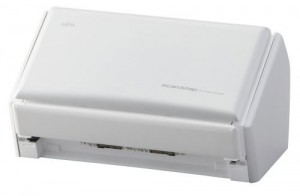
The Fujitsu ScanSnap S1500M breaks the old assumption that a good scanner is a huge, slow, lumbering beast that occupies huge amounts of desk real-estate and yields mostly dubious results.

Fujitsu_ScanSnap_S1500MThe Fujitsu ScanSnap S1500M will neatly fit into any space about the size of your average toaster, it’s even  small enough to pack in your carry-on, ready for your next out of town business meeting or convention. This makes the Fujitsu ScanSnap S1500M the perfect traveling business companion to help you collect and catalogue your business expenses and the stacks of business cards (using the included Cardiris™ 3.6 software) you’ll collect on the road.

At first glance the $495.00 price tag for the Fujitsu ScanSnap S1500M seems a bit steep, until you factor the scanner ships with Adobe Acrobat Professional 8.0, which sells separately for over $400.00 and the ABYY FineReader for ScanSnap™ 3.0 Mac Edition. So when you compare apples to oranges, the price of the Fujitsu ScanSnap S1500M and included software bundle is actually quite a steal.

So how well does the Fujitsu ScanSnap S1500M perform? The Fujitsu ScanSnap S1500M outputs both TIFF and PDF files and scanned PDF files can be made searchable using the included Abby FineReader software. Scanned documents can be searched and organized by location, date and even from within OS X’s built-in Spotlight search function. The Fujitsu ScanSnap S1500M is pure business. Since the scanner isn’t a flatbed, it’s not the best solution for scanning in graphics or priceless old photos (although it does so admirably), but bundled with Acrobat Pro and the ABBY FineReader OCR software, it might just be the best scanner available for mobile and office professionals alike. Oh, did i mention it’s fast. How fast? It’s really, really fast.

Stop in to Austin MacWorks today and let us show you how the Fujitsu ScanSnap S1500M can help navigate the road to a true paperless office in your business environment.

Post to Twitter Post to Delicious Post to Digg Post to Facebook Post to MySpace Post to StumbleUpon

Free Microsoft Office Training Videos Now Available on Mactopia

Friday, October 2nd, 2009

Do you need to get up to speed on the latest edition of Microsoft Office 2008? Maybe you just want to brush up on your Office skills or gain a little more insight into some more advanced Word or Excel techniques.

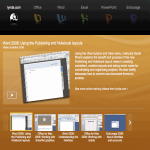
free_office_training_videosCheck out the Mactopia site from Microsoft. Austin MacWorks just noticed that Microsoft is offering a free set of Microsoft Office 2008 training videos from lynda.com. The collection includes 5 videos covering Office 2008 versions of Word, Excel, Entourage and PowerPoint.

The training videos include topics ranging from Microsoft Word’s publishing and notebook layouts, configuring POP and IMAP settings in Entourage, creating presentations in PowerPoint, and workbooks in Excel.

Here’s the link to the Microsoft Mactopia Office 2008 training videos.

Post to Twitter Post to Delicious Post to Digg Post to Facebook Post to MySpace Post to StumbleUpon


Copyright © 2010 Austin MacWorks, All Rights Reserved