How To: Transfer Your Old iPhone/ iPad Information to Your New One

ipad

New in Store: Moshi iGlaze VersaCover for iPad

Thursday, February 7th, 2013

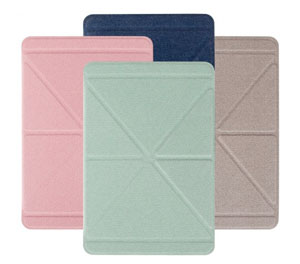
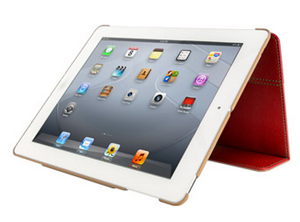
moshi-ipad-coverAustin MacWorks is pleased to offer Moshi’s iGlaze with VersaCover iPad protection.

iGlaze excels at protecting iPad’s aluminium back from scratches, while the VersaCover protects your Retina display with a soft microfiber lining. The VersaCover’s built-in magnet assembly supports iPad’s auto-wake/sleep feature and also doubles as multi-functional stand. Its unique folding design allows iPad to be used in both portrait and landscape modes, providing you with both convenient viewing and comfortable typing angles. For complete protection and functionality, Moshi’s iGlaze with VersaCover is a terrific solution for your iPad.

  • Compatible with New iPad 3rd & 4th Generation (Newest Model)
  • Unique folding cover doubles as a stand for both portrait and landscape modes. Complete front and backside iPad protection in a sleek, minimalist form factor.
  • The iGlaze with VersaCover has a hard shell back and a microfiber cover that can be folded to create a stand.
  • Unhindered operation of all iPad buttons and cameras. Supports iPad’s auto-wake/sleep function.

Austin MacWorks has these slim and functional covers for sale in both stores. $60 for original iPad; $55 for iPad Mini.

New in Store: exec iPad Case

Thursday, November 1st, 2012

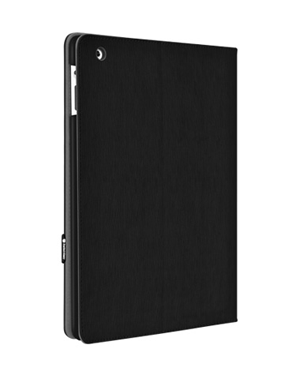
Austin MacWorks is pleased to offer SwitchEasy’s exec case, a cutting-edge iPad case featuring a brand-new, patent-pending latch design.

SwitchEasy utilizes a special water-resistant, shock-absorbent, matte-finished outer shell that is both soft to hold but also easy to grip. The inner frame is made of strong, durable polycarbonate plastic that serves as  secondary protection in the event your iPad is dropped. In addition, the inner lining is made of premium microfiber so your iPad will be always be caressed and pampered from the inside out. The exec supports the On/Off feature that automatically puts your iPad to sleep when the folio is closed. All in all, exec is a very smart folio product for your iPad.

Among the exec’s features:

  • Thinnest folio design in the market
  • Brand new, patent-pending design for easy installation of your iPad
  • Built in auto on-off functionality for your iPad within the folio
  • Shock proof case made from ultra tough polycarbonate and PU material
  • Fully covered design to cover the most area of your iPad
  • Durable PU material outer shell for longer durability

Switcheasy says that what makes exec really special is that they re-invented how a folio can be made. The company set out to make the thinnest folio in the market. By designing a snap frame instead of a full plastic shell, Switcheasy shaved off the width of the full shell. Providing multiple viewing angles, exec lets you enjoy your content on the go how it should be enjoyed—in full glory. Stand assembly is both quick and easy—just snap over the right side of the frame and align the iPad with the grooves to make your iPad stand solid. exec works great as a folio with a fully rotating cover that makes confined viewing on a busy bus or train simple and convenient. And when you’re done, just flip the cover back around and the magnetic latch with keep the lid closed.

exec is $59.99 and available right now at Austin MacWorks.

Wrap-up of New Apple Products

Wednesday, October 24th, 2012

Apple announced several new products yesterday—so many that our heads are spinning! Here’s a quick synopsis of all the new offerings. We’ll keep you posted as to when these goodies are available in store.  Be sure to like us on Facebook and follow us on Twitter so you get all the latest info!

The iPad mini

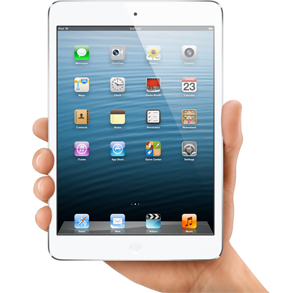
It’s a sleek, thin and light 7.9-inch tablet made of anodized aluminum and glass that follows the format reduction pioneered by Google and Amazon. It’s really light and thin at 0.68 pounds and 7.2 millimeters.

It has better specs and it’s thinner and lighter than the Amazon Kindle Fire HD and the Google Nexus 7, but much more expensive too.  It starts at $329 for the Wi-Fi only version, with 16GB of storage. The 32GB and 64GB are $429 and $529. If you want the LTE connectivity, you will have to pay $130 more.


The iPad 4

The new regular-sized iPad has a new, twice-as-fast processor and U.S. 4G-LTE coverage. The new iPad comes with Apple’s Lightning connector. Previous versions featured the significantly larger 30-pin connector that Apple has used since 2003. This new iPad replaces the iPad3.

Apple’s 9.7-inch iPad lineup starts at $399 for the iPad 2 and $499 for the fourth-generation iPad.


The new Mac Mini

The Mac mini still starts at $600 (or $1000 for the server version), but its options for internals have been upgraded across the board. The new Mac mini sports a third-generation Ivy Bridge 2.3-GHz Intel Core i7 processor,


The new iMac

Still available in 21- and 27-inch models, the 8th-generation iMacs have been slimmed down as much as 80% in places and (depending on options) are up to eight pounds lighter.

By eliminating the optical drive and implementing full display-to-glass lamination for a 45% thinner display system, Apple’s engineers have built an all-in-one PC that’s just 5mm thick on all edges.

Both the iMac and Mac Mini introduce a new storage feature, which Apple calls the “Fusion” drive. By dynamically integrating a 128GB solid state drive with a 1TB hard disk through OS X, the new Fusion drive purports to offer nearly the same level of performance as an SSD without making the typical sacrifice in storage capacity.

The 21-inch iMac starts at $1300 and begins shipping this November. For a new 27-incher, you’ll pay at least $1800 and have to wait till December.


13-inch MacBook Pro Retina

The new Macbook is sleeker, clearer, and slightly more expensive than the 13-inch Macbook Pro, the Retina Display’s predecessor, which came out back in June. For $1,699, Retina Display users get a 2.5-GHz, dual-core i5 processor with 8GB of RAM and 128GB of storage (For an extra $300, users can purchase an extra 128GB of storage). Buyers can also opt for the dual-core i7 Ivy Bridge CPU. The updated Mac is only 0.75 inches thin, 20% thinner than its predecessor. It weighs in at 3.5 pounds, making it the lightest MacBook Pro ever. For user convenience, it comes pre-loaded with Mac OS X Mountain Lion and supports 802.11 Wi-Fi, as well as Bluetooth 4.0. Apple has promised up to seven hours of battery life.

In Store: Pelle iPad Cases

Wednesday, October 24th, 2012

Check out these stylishly functional iPad cases that Austin MacWorks has in stock!

Pelle is an ultra-thin protection solution unlike any other in the market. Pelle is unique in its class as it is thinner and tougher than any of its competitors. Featuring a unique key lock design, Pelle allows you to easily change the viewing angle of your iPad with a flick of the lock. Pelle  also features a maintenance-free polyurethane faux leather front cover with a ultra-tough back shell processed with matte rubber coating. In addition, our special pink and turquoise edition features a special gold lock accented with Swarovski Crystals for the fashion conscious in you.

The thing that makes Pelle really special is how it allows you to use your iPad.  Pelle folio design plus stand function offers up a completely new way to enjoy your iPad. Providing multiple viewing angles, Pelle lets you enjoy your content on the go, the way it should be enjoyed. Stand assembly is both quick and easy— just flip the cover around and your iPad will stand solid with landscape view. For other viewing angles and for typing, just pull the key lock and flip the cover around.  Pelle also works great as a folio with a fully rotating cover that makes confined viewing on a busy bus or train simple and convenient. And when you’re done, just flip the cover back around and secure with the snap-in clip.

Pelle’s auto-sleep feature is fantastic functionality  for the energy conservationist in you. With a simple flip of the cover, your iPad will be automatically turned on or off as you please. The cases are available in a variety of colors.

Among Pelle’s features:

  • Unique Key Lock design for changing viewing angle
  • Maintenance free Polyurethane Faux Leather front cover
  • Ultra tough polcarbonate back shell processed with matte rubber coating
  • Ultra slim folio design
  • Automatic On-Off function for the iPad 2/ the new iPad (2012)


Apple’s New iPad Estimated to Cost Less than $2 Per Year to Charge

Thursday, June 28th, 2012

iPad 3rd generationThe third-generation iPad is many great things, but it’s definitely NOT a drain on your electric bill!

A new study finds that it costs less to recharge a fully-drained Retina Display-toting iPad every other day for a year than it does to run a 60-watt compact fluorescent light bulb continuously over the same period. The cost to charge the iPad is $1.36, the study found.

According to a study from the Electric Power Research Institute (EPRI), an independent non-profit organization focusing on electricity research and development, Apple’s new iPad and devices like it could help lower the high power consumption seen as a result of the Information Age, reports the Associated Press.

As smartphones and tablets become more popular and accessible, the EPRI wondered if the flood of new devices was having a negative impact on power consumption. What the group found was that charging a device once every other day from full discharge costs mere pennies per day, a dramatic reduction from large electronics like HDTVs and PCs.

Testing pitted a variety of Apple’s mobile products including the overwhelmingly popular iPad, which has sold over 67 million copies as of April, against other household appliances to project energy use in a “post-PC” era.

“As information technologies continue to change rapidly we see important implications for energy consumption,” said EPRI Vice President of Power Delivery and Utilization Mark McGranaghan. “These results raise important questions about how the shifting reliance from desktop to laptop to mobile devices will change energy use and electricity requirements for the information age. “

iPad App Offers Great iPad Tutorials

Tuesday, June 19th, 2012

scotutor

If you’re new to iPad, you might want to check out SCOtutor for iPad, which is a comprehensive video guide to using the iPad.

Starting from first principles, this video tutorial leads you through all aspects of using an iPad in simple steps. Covering all the new features of iOS5 and iCloud, as well as how to use all the standard iPad applications, SCOtutor for iPad is an indispensable guide for all iPad users.

View the tutorial using the specially designed video player, allowing you to control and navigate the tutorial easily, via the keyboard or via the on-screen controls, all at your own pace.

Keep it on your Desktop or in your Dock as a quick reference guide. When you close the tutorial, it remembers your position and restarts just where you left it!

Check out SCOtutor for iPad!


How to Transfer Your Data from Your Old iPad to Your New iPad via iCloud

Tuesday, May 8th, 2012

ipad 3If you haven’t already purchased your new iPad, you probably will soon, and you’ll want to transfer your data from your old one to your new one. We told you a couple weeks ago about how to do move your data via iTunes, and now we’ll tell you about a different way of doing it, via iCloud.

On your old iPad, go to settings, select iCloud and then choose Storage and Backup. Then tap on Backup Now.

On  your new iPad, select Restore From iCloud Backup from the Set-up screen.   Login to your iCloud account, select your most recent backup, and select restore. Let the transfer load onto your new iPad and you’re done.  Easy!

Consumer Reports Says New iPad the Only “Excellent” Tablet

Thursday, April 5th, 2012

Despite recording the highest temperature readings among a series of lab testers seeking to find if the new iPad was really running hotter than the previous model, or other similar tablets or notebooks, Consumer Reports, says it “didn’t find the temperatures to be cause for concern.”

The group has listed the new iPad as a “recommended” product, and describes it among 9-12 inch tablets as the only one achieving an “excellent” rating, saying the “high-resolution screen of the new iPad establishes a new benchmark in excellence, providing the best rendering of detail and color accuracy we’ve ever seen on a tablet display

“Performance on the new iPad ($500 to $830) was superb in virtually every other way as well,” the site states. “The 5-megapixel camera took very good photos. Verizon’s 4G network yielded very fast, dependable connectivity to a 4G-compatible version of the iPad in our informal tests. And despite the energy-intensive display and graphics, the iPad still has longer battery life than all other tablets.”

Highlighting the “standout performance of the new iPad’s screen,” the site stated, “we have recalibrated our standard of excellence for tablet screens. The iPad alone now receives an excellent overall score for display quality.

“A number of current models, including the iPad 2 (which remains on sale and is a fine performer), that received excellent scores under the past standard will now be adjusted to receive very good scores overall. Likewise, some models that received good scores may also be adjusted downward, and some overall scores have changed slightly.”


Consumer Group Gives New iPad Good Report

Wednesday, April 4th, 2012

changewave-researchA new report by the research group ChangeWave finds that 98 percent of new iPad buyers say they are satisfied with their purchase, a one percentage point increase over iPad2. Significantly more users are now reporting that they are “very satisfied,” according to the report.

82 percent report being “very satisfied” with the new Retina Display iPad model, a jump over last year’s iPad 2, where 74 percent of users responded similarly.

Among the features of the new iPad that impress users were its high resolution Retina Display, which 75 percent of users listed in their top three favorite features, along with 22 percent liking its long battery life, 21 percent calling out its 4G LTE data service option, 20 percent citing speed, 18 percent its newly improved camera, and 13 percent citing the wide range of apps available.

How To: Transfer Your Old iPhone/ iPad Information to Your New One

Tuesday, April 3rd, 2012

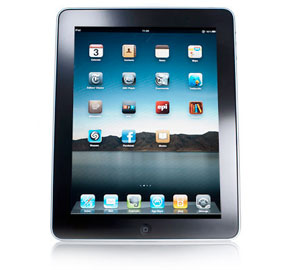
ipad-3You’ve got that shiny new iPad.  Now you’re wondering how to transfer your data from your old iPad to your new iPad.

It’s easy, even if you don’t have an iCloud account.

To start, plug in your iPad (or iPhone) and open iTunes. Then sync your device and back it up. Next you will need to connect your new device. When a screen pops up for the device, click “Restore From Backup.”

That’s it!


Copyright © 2013 Austin MacWorks, All Rights Reserved