Keep Kids Busy This Summer with These iPad Apps

kids

Keep Your Kids’ Minds Sharp This Summer

Thursday, June 14th, 2012

MacWorld offers these great ideas for avoiding summer brain drain.

1. Learn at your own pace

If you check out only one resource for your elementary-, middle- or high-school-aged kid this summer, make sure it’s online learning sensation Khan Academy, also available as an iPad app. This non-profit educational resource, backed by the Bill and Melinda Gates Foundation, originally started as a collection of tutorial videos Salman Khan made to help his cousin with her math homework. After he became a YouTube sensation, Khan quit his job as a hedge fund analyst and turned Khan Academy into a immense free resource with more than 3100 instructional videos covering K-12 math, science, and humanities topics.

Videos run no more than 10 minutes long. Math topics and are supported with interactive challenges and assessments. Kids can earn badges and points in a variety of ways. Parents can also check in using a “coach” account to see extremely detailed reports about how the child is faring. This is the best resource yet for self-paced learning.

2. Build Legos with the astronauts

Lego fans always have loads to do during the summer. While away the afternoon with new Lego Mindstorms projects or a Lego ideas book like The Lego Mindstorms NXT 2.0 Discovery Book: A Beginner’s Guide to Building and Programming Robots.

Or, for a new twist, try out some Legos in space. Last year, the space shuttle Endeavour took a set of kits up to the astronauts on the International Space Station. Now you can follow along with their work on Lego and NASA’s joint site, Legospace.com. The site is geared to classrooms and filled with activities. Kids will get a kick out of the many videos of astronauts assembling models and explaining simple machines while floating around in jumpsuits.

3. Try this at home

While parents-in-the-know everywhere ready their Mentos Geyser Tubes at the first hint of long summer afternoons, many of us need some ideas for hands-on science projects to share with our kids. The venerable Steve Spangler Science site is filled with kits, ideas, and videos. For instance, don’t miss the Geyser Rocket Car or Instant Snow Powder.
The ambitious parent-kid team may enjoy Make magazine’s DIY projects.For the very, very ambitious, Make Magazine also includes a section of project for kids and their parents. Some are reasonably easy, like the Marshmallow Shooter, others will require soldering electronics, like the Gigantic Bubble Generator.

Don’t fail to check out more home-grown sites too, like Kitchen Pantry Science, that show you how to do science experiments with ingredients you most likely have tucked in a cupboard. These projects are simple and easy to set up, from how to create your own Angry-Birds-style slingshot game to making invisible ink.

4. Forget flash cards

Feed the world while you memorize geography and multiplication tables at Freerice.com.Free Rice adds a different twist to learning things by rote: the more questions you answer correctly, the more you help others. This non-profit website is run by the United Nations World Food Programme. Sponsors donate 10 grains of rice to hungry people across the world for each question you answer correctly. Categories include world flags, countries, capitals, multiplication tables, chemistry symbols, famous paintings, vocabulary from four foreign languages, anatomy, SAT prep, and more. Keep track of your scores and even create a team so classmates or friends can work together. With every right answer, rice piles up in your virtual bowl. What better motivation to memorize?

5. Get ready for the APs

Nervous about next year’s AP classes? You can brush up on the basics with online courses from McGraw-Hill.ONBoard online courses from McGraw-Hill help high school students prepare for next year’s Advanced Placement classes. Schools can purchase this review for their students or students can subscribe on their own for $50 per class with 12-month access.

The courses go over skills and concepts for classes including AP Biology, Economics, Environmental Science, Psychology, US Government & Politics, US History, and World History. For example, the AP US History class covers how to analyze primary and secondary sources as well as how to gather and organize information.

Students complete interactive exercises and quizzes, and at the end of each class, receive a final assessment so they know what they need to work on next.

6. Train your brain

The “brain training” site Lumosity is full of games designed to improve overall cognitive qualities, like memory and attention.One of the hottest areas of online learning is “brain training,” games designed to help improve overall mental qualities like memory, attention, speed and problem solving. Lumosity boasts more than 20 million subscribers and a long list of academic endorsements. You’ll find games targeted to school-age children in its student section, Lumosity Scholar as well as some designed to help with specific learning differences like ADHD. Games include Word Bubbles, Face Memory Workout, Memory Matrix, Speed Match, and more. The site tracks your progress over time.

A 1-year gift subscription costs $80; a 1-year family membership, with up to five accounts, costs $130. The Lumosity.com games require Flash and can’t be played on your iPhone or iPad. However, the company does offer a small subset through six iOS apps.

7. Become a coding ninja

Does your kid long to code? This strangely named site, Codecademy—look again, it’s not actually “Code Academy”—offers free programming instruction in a fun, accessible way. Build your knowledge through manageable exercises on programming basics, CSS, HTML, Javascript, and more. Each module is followed up with a project—from creating a recipe card to making a fully-working blackjack game—that brings together the skills you’ve learned.

8. Goose your gray matter on the go

If your kid loves puzzles, Mensa Brain Test may fit the bill.Wake up a sleepy head with the Mensa Brain Test from American Mensa. This $2 iPhone app helps boost your logic, mathematics, language, and visual skills through training exercises. Tests and exercises take anywhere from five to sixty minutes a pop, so it’s easy to fit in a mental workout while waiting in line for the wave pool or killing time in the backseat during the family roadtrip.

Younger kids might appreciate iPhone and iPad games in the TeachMe series, including the $1 TeachMe: Kindergarten, TeachMe 1st Grade, and so on. Kids practice skills like addition and sight words and use the app’s handwriting recognition to write their answers on-screen. Best of all (according to my daughter), correct answers earn coins to decorate an interactive aquarium or to collect onscreen stickers and Silly-Bandz-style bands.

Keep Kids Busy This Summer with These iPad Apps

Thursday, May 31st, 2012
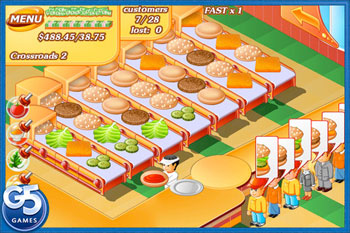
standofood app

Screen grab from Stand O' Food app

We know you don’t want your kids doing the electronics thing all day every day this summer.  But after they’ve had a good long turn outside and it’s time to come inside and cool down a bit, you might want to let them play with any of these great apps:

Creatures of Light

Creatures of Light was developed by the American Museum of Natural History and is a fascinating look at bioluminescence, which is the ability some organisms have to produce light. From the sea firefly to poisonous millipedes, the world of bioluminescence is amazing to view, for all ages. The museum apparently uses iPads in their exhibit and has used that content to create this app, which is well-done and should prove extremely interesting for older kids (and their parents and teachers.) Free.

Harbor Master HD

A challenging game for kids 7 and up involving multi-tasking and organizational skills with a great deal of fun. You have to dock an endless stream of boats with cargo at a variety of docks. The boats will only drop their cargo at particular docks, adding to the challenge. If the boats come too close to each other you hear a warning toot on the horn and then it’s move a boat FAST or they’ll crash and you have to start all over again. The game speeds up with more and more boats trying to land their cargo. The add ons are great offering additional opportunities and variations on the same great game theme. Free.

Stand O’Food

Have the experience of running your own lunch-food restaurant. Serve customers, collect money, buy new things for your business to make more money. Try to keep the customers happy with the food they order. A fascinating and  challenging game for kids 7 and up. Stand O’Food has a free version so you can try it out, but the full version is worth the investment. $5.99

Mickey Mouse Clubhouse Road Rally

Take the TV show viewing experience to the next level with the first in the appisode series, Mickey Mouse Clubhouse “Road Rally”. The appisode brings viewing and learning together in one interactive and cohesive experience! Touch, shake, swipe, drag and talk your way through an entire episode of Mickey Mouse Clubhouse right on your iPad. Participate directly in the storyline by completing various activities to help Mickey and friends cross the finish line! There’s laughter and fast-paced learning fun around every corner in Mickey’s Road Rally! Free.

Lego Duplo Jams

A great app for kids ages 2-5. Catchy tunes played in the background make the building process fun. Toddlers can use bricks and explore various worlds while singing along with the songs. Preschoolers can learn the alphabet and improve their memory. Free.

Disney’s Jake’s Never Land Pirate School

Ahoy and welcome to Pirate School, Matey! Join Jake and crew for four fun-filled pirate themed classes and earn Badges of Honor and an Official Never Land Pirate Certificate. Classes include: Sailing, Pirate Band, Map and Spyglass and Pixie Dust. Free.

Bobo Explores Light

With Bobo, a little robot, kids 7 and up embark on a book-based journey to explore the scientific concepts of light. But instead of just reading material, this app is filled with videos, fun facts and hands-on explorations. This app transforms complicated science into a fun, interactive experience that blends learning with humor. $4.99

Bartleby’s Book of Buttons Vol. 2: The Button at the Bottom of the Sea

For kids 3-5, this rollicking app offers 17 pages of treasure hunting under the sea and is part book and part puzzles. Kids join an eccentric collector of rare buttons on a quest to find a stone button buried in the ocean’s floor. Unlike many book apps where the interactions on the pages are optional, in this app kids must solve puzzles on each page to move the story along. Kids will push buttons and flip switches to make things happen on the page, including navigating a water maze by tilting the iDevice to match the water’s current. This is the second in the series; so if you love it, download “Bartleby’s Book of Buttons Vol.1: The Far Away Island” too. $2.99


Copyright © 2013 Austin MacWorks, All Rights Reserved