Apple Updates Snow Leopard Printer Drivers

Posts Tagged ‘Scanner’

Apple Updates Snow Leopard Printer Drivers

Tuesday, November 17th, 2009

Apple has released printer driver updates with compatibility fixes and additional drivers for printers from Brother, Canon, Epson, HP and Lexmark.

To install the updates, make sure that you have the devices powered on and connected to your Mac or on your network. Now, navigate to: Apple menu > Software Update and launch the Software Update application. If there are newer drivers available for your printer or scanner, the drivers will appear in the available update list.

You can also find a full list of the printer and scanner drivers included with Mac OS X 10.6, or Snow Leopard, on-line at the Apple Support Web site.

Post to Twitter Post to Delicious Post to Digg Post to Facebook Post to MySpace Post to StumbleUpon

The ScanSnap Scanner from Fujitsu Adds Snow Leopard Compatibility

Wednesday, November 11th, 2009

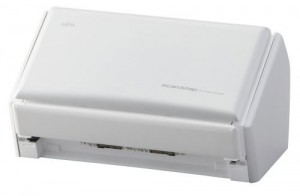
The excellent ScanSnap family of scanners from Fujitsu have had their software updated to the ScanSnap Manager software package, bringing ScanSnap scanning to Mac Snow Leopard users. The software preference patch offers a workaround for Snow Leopard users by temporally disabling the “Quick Menu” and “Scan to Office” functions until Fujitsu offers a full software update for the ScanSnap. The download and instructions for the patch are available here. Essentially, download the .zip file, unzip it and drag the “jp.co.pfu.ScanSnap.V10L10.plist” to your “user/library/preferences” folder and replace the old .plist with the new one.

Post to Twitter Post to Delicious Post to Digg Post to Facebook Post to MySpace Post to StumbleUpon

Fujitsu ScanSnap S1500M – The Mac Scanning Solution for the Business Professional

Friday, October 2nd, 2009

The Fujitsu ScanSnap S1500M breaks the old assumption that a good scanner is a huge, slow, lumbering beast that occupies huge amounts of desk real-estate and yields mostly dubious results.

Fujitsu_ScanSnap_S1500MThe Fujitsu ScanSnap S1500M will neatly fit into any space about the size of your average toaster, it’s even  small enough to pack in your carry-on, ready for your next out of town business meeting or convention. This makes the Fujitsu ScanSnap S1500M the perfect traveling business companion to help you collect and catalogue your business expenses and the stacks of business cards (using the included Cardiris™ 3.6 software) you’ll collect on the road.

At first glance the $495.00 price tag for the Fujitsu ScanSnap S1500M seems a bit steep, until you factor the scanner ships with Adobe Acrobat Professional 8.0, which sells separately for over $400.00 and the ABYY FineReader for ScanSnap™ 3.0 Mac Edition. So when you compare apples to oranges, the price of the Fujitsu ScanSnap S1500M and included software bundle is actually quite a steal.

So how well does the Fujitsu ScanSnap S1500M perform? The Fujitsu ScanSnap S1500M outputs both TIFF and PDF files and scanned PDF files can be made searchable using the included Abby FineReader software. Scanned documents can be searched and organized by location, date and even from within OS X’s built-in Spotlight search function. The Fujitsu ScanSnap S1500M is pure business. Since the scanner isn’t a flatbed, it’s not the best solution for scanning in graphics or priceless old photos (although it does so admirably), but bundled with Acrobat Pro and the ABBY FineReader OCR software, it might just be the best scanner available for mobile and office professionals alike. Oh, did i mention it’s fast. How fast? It’s really, really fast.

Stop in to Austin MacWorks today and let us show you how the Fujitsu ScanSnap S1500M can help navigate the road to a true paperless office in your business environment.

Post to Twitter Post to Delicious Post to Digg Post to Facebook Post to MySpace Post to StumbleUpon


Copyright © 2010 Austin MacWorks, All Rights Reserved