New Arrivals at Austin MacWorks – QuickerTek Nano & AirHawk Mobile Pocket Hard Drives

Wifi

Austin MacWorks Has The All-New Airport Express

Tuesday, July 10th, 2012

airport expressAirPort Express is a Wi-Fi base station. Besides acting as an Internet access point, it has several specialized features that make it ideal for specific needs.

  • AirPlay – Wirelessly stream music to your entertainment system.
  • Printer – Act as a wireless interface for one printer connected to the USB port, making it available to your network
  • Act as a single Wi-Fi interface to any computer or almost any other devices such as game consoles that has an Ethernet port but doesn’t itself have built-in Wi-Fi
  • Extend the wireless range of your existing Wi-Fi base station

With AirPort Express, getting your new Wi-Fi network up and running takes less time — and less effort — than making a cup of coffee. That’s because a setup assistant is built into iOS and in AirPort Utility for OS X. And if you use a Windows PC, you can download AirPort Utility for free. As soon as you plug in your AirPort Express Base Station and connect it to your DSL or cable modem, you can follow the simple instructions on your computer or iOS device. There are no complicated steps to follow and no obscure terminology to learn. The setup assistant does all the work, so you don’t have to.

Once your network is set up, AirPort Utility for iOS and OS X lets you manage and monitor it from your iPad, iPhone, iPod touch, or Mac. Your AirPort Express — along with other AirPort base stations you have connected — appears graphically onscreen, so you can see your settings at a glance, make changes, apply updates, and more.

The new AirPort Express supports simultaneous dual-band 802.11n Wi-Fi. That means it transmits at both the 2.4GHz and 5GHz frequencies at the same time. So no matter which band your wireless devices use, they’ll automatically connect to the best available band for the fastest possible performance.

If you already have a wireless network in your home and want to extend its range, AirPort Express can help. Just place it in range of your primary base station — an AirPort Extreme, Time Capsule, or another AirPort Express — and near the area where you want your wireless connection. Launch the easy-to-use AirPort Utility app on your iOS device or Mac, and you’re mere minutes away from long-range Wi-Fi enjoyment.

Come in to Austin MacWorks, and we’ll help you get all set up with Airport Express.


New Arrivals at Austin MacWorks – QuickerTek Nano & AirHawk Mobile Pocket Hard Drives

Monday, September 28th, 2009

austin macworks quickertek nano

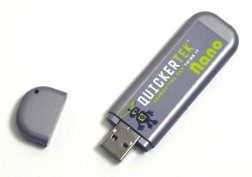
The QuickerTek Nano USB WiFi thumb drive will let all Mac users extend the range of their WiFi reception, and let you connect to wireless signals that your MacBook, MacBook Pro, Mac Pro or old-school PowerBook may not even see with just their internal Airport antenna. PowerBook G4 owners will love the QuickerTek Nano even more. The Titanium and Aluminum PowerBooks were known for their amazing design, however the shiny metal didn’t always offer the best WiFi reception. One simple driver and its plug and play extended WiFi on your iMac, MacBook or PowerBook with the QuickerTek Nano.

austin macworks high speed portable hard drivesWe saw the new AirHawk Mobile Pocket Hard Drives and  just had to offer them to our Austin MackWorks customers. The sleek and slightly angular design will look like it was custom made to sit next to your MacBook Air and MacBook Pro. The self-powered AirHawk Mobile Pocket Hard Drive is available with up to half a terabyte of drive space and comes out of the box with USB 2.0, FireWire 400 and FireWire 800 ports. If you’re doing media intensive projects such as iMovie, GarageBand, Final Cut, Logic or other high-end editing packages such as Pro Tools, the 7200 RPM drive combined with FireWire 800 speed will let you edit even the biggest audio and video projects while you’re on the road or just out for the weekend. Stop in today and let us introduce you to the full range of the AirHawk Mobile Pocket Hard Drives.


Copyright © 2013 Austin MacWorks, All Rights Reserved